
Data Analyst CV Template: The Complete Guide to Landing More Interviews in 2026
A data analyst CV has one job: prove in six seconds that you can turn raw numbers into decisions a business can act on. Most CVs fail that test not because the candidate lacks skill, but because the document buries the proof under vague duties, cluttered formatting, or a layout that applicant tracking systems can't even parse. This guide gives you a data analyst CV template you can copy directly, plus the reasoning behind every section so you're not just filling in blanks — you're building a document that survives ATS screening and convinces a hiring manager in the first glance.
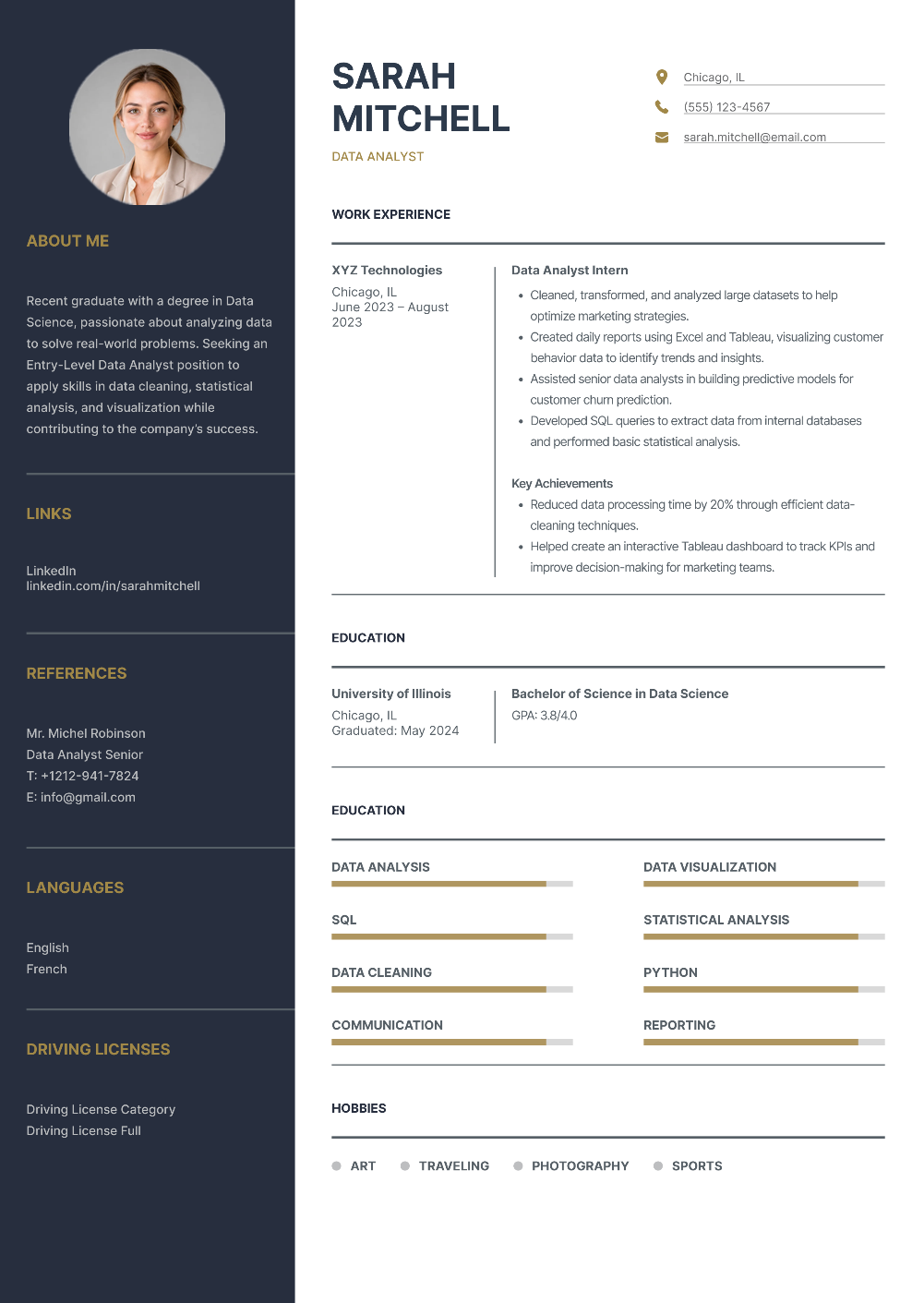
Why this template
- Two-column layout with navy sidebar for contact context, skills, and languages
- Main column for name, title, summary, quantified work history, and education
- Skill labels that ATS systems can read — not bars alone
- Section-by-section writing tips for entry-level through senior analysts
- Free live editor and watermark-free PDF download
Best for
Entry-level and graduate data analystsMid-level analysts with 2–5 years of experienceSenior or lead analysts highlighting scope and impactCareer changers targeting data analyst rolesAnyone who needs an ATS-conscious data CV
What a strong data analyst CV looks like
Below is a full example of the layout we recommend: a two-column format with a clean sidebar for contact details, skills, and languages, and a wider main column for your summary, work history, and education.
Notice three things about this layout before you touch a word of the text:
- The name and job title sit at the very top of the main column, not buried in the sidebar. Recruiters scan left to right, and your title should be the second thing they read after your name.
- The skills section uses named skills, not just proficiency bars. A bar alone tells an ATS nothing — the system reads the text label ("SQL," "Python," "Data Visualization"), so keep the labels literal and specific rather than clever.
- The work experience section leads with the achievement, not the job description. Every bullet under "Key Achievements" starts with a number. That's deliberate, and it's the single biggest lever you have for standing out.
Section 1: Header — make yourself easy to contact and easy to categorize
Your header needs four things and nothing more: your name, your target job title, a phone number, and an email address. Add your city and state (full street address isn't necessary), and if you have one, a LinkedIn URL or portfolio link.
Two mistakes show up constantly in this section:
- A vague or missing job title. "Data Analyst" tells an ATS exactly which resumes to surface for a data analyst search. A blank space under your name — or a title like "Professional" — gives the system nothing to match against.
- A personal email that undercuts your credibility. Stick to a variation of your name at a standard provider. Save the nickname handles for personal use.
Section 2: Professional summary — three sentences that prove you belong
A resume summary sits directly under your header and gives a hiring manager the 10-second version of your candidacy: how many years of relevant experience you have, your strongest technical tools, and one measurable result.
Here's the difference between a summary that gets skipped and one that gets read:
WeakDetail-oriented professional with experience in data analysis, seeking a challenging role to apply my skills.
StrongData analyst with 4 years of experience turning customer and operations data into forecasting models. Proficient in SQL, Python, and Tableau, with a track record of cutting manual reporting time and improving forecast accuracy for cross-functional teams.
Section 3: Work experience — the section that actually gets you interviews
This is where most data analyst CVs lose the reader. The fix is a simple formula: Action verb + what you did + the measurable result.
Compare these two ways of describing the same job:
- Start with a strong verb — analyzed, built, automated, forecasted, streamlined, identified — never "responsible for" or "helped with."
- Quantify wherever you can. Time saved, error rate reduced, revenue influenced, dataset size, number of stakeholders.
- List your most recent role first and work backward. This reverse-chronological order is what both ATS software and human recruiters expect.
- Tailor the bullets to the job posting. If the listing emphasizes A/B testing or a specific tool like Power BI, make sure that language appears in your bullets.
Generic (avoid this)Responsible for data reporting tasks; Assisted senior analysts with dashboards; Worked with SQL to pull data.
Specific (use this instead)Built weekly SQL queries against a 2-million-row customer database, cutting manual report prep time by 6 hours per week; Designed a Tableau dashboard tracking churn indicators, adopted by the retention team to prioritize outreach; Cleaned and standardized inconsistent sales data across three regional systems, reducing reporting errors by 20%.
Section 4: Skills — the keywords that get you past the ATS
Most mid-to-large companies now filter CVs through an applicant tracking system before a human ever opens them. That system searches for exact keyword matches against the job description, so your skills section needs to speak its language.
Group your skills into two categories. Technical skills: SQL, Python, R, Excel, Tableau, Power BI, statistical analysis, A/B testing, data cleaning, ETL processes, data warehousing, machine learning fundamentals. Domain or soft skills (only if they're specific): stakeholder communication, cross-functional collaboration, requirements gathering.
Two practical tips: read the job description and mirror the exact terms it uses (if the listing says "Microsoft Power BI," write that instead of just "BI tools"), and keep the list to 8–12 items rather than every tool you've ever touched — a padded list reads as unfocused rather than impressive.
Section 5: Education and certifications
List your highest degree first, including the institution, location, and graduation date (or expected date). If you're early in your career, this section can sit near the top, right under your summary; once you have a few years of relevant work experience, move it below your experience section since your track record now carries more weight than your degree.
Certifications matter more in data analytics than in many other fields, because the tools change faster than degree programs do. If you have any of the following, give them their own short section:
- Google Data Analytics Professional Certificate
- Microsoft Certified: Power BI Data Analyst Associate
- IBM Data Science Professional Certificate
- Tableau Desktop Certified Associate
- SAS or AWS analytics certifications
Formatting rules that protect you from ATS rejection
A beautifully designed CV that an ATS can't parse never reaches a human. Keep these constraints in mind regardless of which template you choose:
- Avoid tables and text boxes for your work experience or skills sections. Some ATS parsers read tables in the wrong order or skip them entirely. The circular photo and colored sidebar in the template above are safe because they're decorative, not content-bearing — the actual text still flows in standard blocks.
- Save and submit as a PDF. PDF preserves your formatting across devices and is what most online application portals expect.
- Stick to one page if you have under 8–10 years of experience, and no more than two pages beyond that.
- Use a standard, readable font (11–12pt body text) and consistent spacing — inconsistent margins are a small detail that reads as carelessness.
- Name the file clearly: firstname-lastname-data-analyst-cv.pdf, not "resume_final_v3.pdf."
Common mistakes that quietly sink a data analyst CV
- Listing duties instead of outcomes. "Worked with large datasets" says nothing an ATS or a human can act on. Say what you built, cleaned, forecasted, or automated, and what changed because of it.
- Skipping the summary or objective entirely. Even three lines here dramatically improve how fast a recruiter understands your fit.
- Using the same CV for every application. Tailoring your skills and bullet language to each job description takes ten extra minutes and measurably improves your match rate against ATS keyword filters.
- Overloading the skills section. Fifteen-plus tools with no context reads as unfocused. Prioritize what the job actually asks for.
- Forgetting a photo policy check. Photos are standard on CVs in much of Europe, Asia, and the Middle East, but many US and Canadian employers explicitly ask candidates not to include one to reduce bias in screening. Confirm local norms before adding a headshot like the one in the template above.
Data analyst CV template by experience level
Entry-level or new graduate: Lead with education and a short objective. Replace a thin work-experience section with academic projects, a capstone analysis, or a personal Kaggle/GitHub project — describe what dataset you used, what tool you applied, and what you found.
Mid-level (2–5 years): Lead with your professional summary and experience section. This is where the bullet-point formula above matters most, since you should have several quantifiable wins to draw from.
Senior or lead-level: Add a "Key Achievements" or "Selected Projects" section that highlights your two or three biggest wins, separate from the day-to-day experience list. Senior reviewers want to see scope (team size, budget influence, systems you owned) as much as technical depth.
How to use it
Open the free Data Analyst CV template in AsliCV.
Add your name, target title, contact details, and a short summary with tools and one measurable result.
Fill work experience with action-verb bullets that quantify impact, then download PDF when the preview looks right.
Frequently asked questions
Related templates
Ready to build yours?
Edit online with live preview and download a free PDF — no watermark.